
Issue is fixed in FLDT v.12.0.0
There is a bug in FLDT (11.0.0) regarding loading components non FlexLink components from the Visual Components eCatalog when opening a saved layout. These are typically components found in Items by Type or Items by Manufacturer. Depending on the geometries in the components it is either no geometries or only some of it.
Unfortunately the bug is both for old Visual Components eCatalogs as well as the latest one.
The workaround is to keep these catalogs local on your machine.
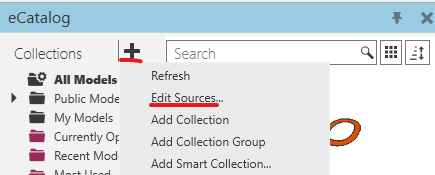
- In the eCatalog, press the plus icon and select Edit Sources...
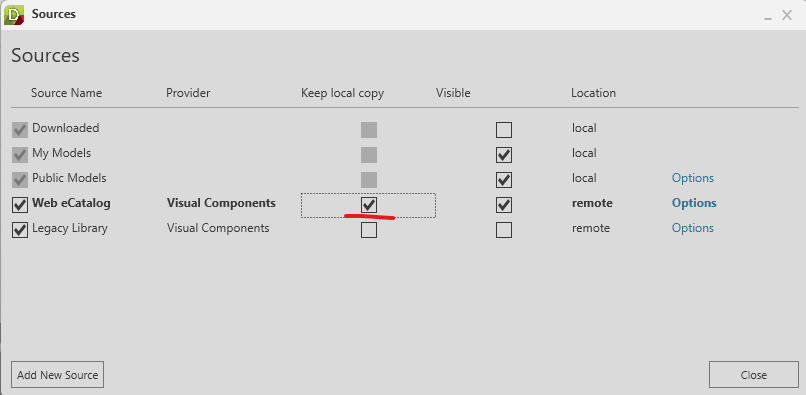
- To be able to open a layout built with FLDT 11.0.0, Enable Keep local copy for the Web eCatalog from Visual Components, this will initiate downloading the entire VC 4.10 eCatalog to a local area (%LocalAppData%\FlexLink\FLDT\Local Copies) on your PC, this might take a while since there are ~4000 files ~5gb
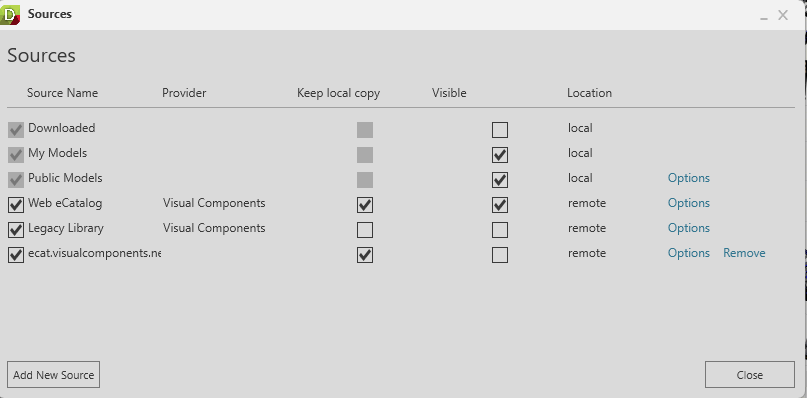
- (Only if you need to load older FLDT files) To be able to open a layout built with older versions of FLDT, press Add New Source and select the uri https://ecat.visualcomponents.net/elib/4.7/catalog.xml press OK and then select Keep local copy for that one as well. In order to not see components from this older version in the eCatalog you can uncheck Visible for your newly added source.
Note that the download might take a while, but when done you should be able to load your layouts properly.
The reason we do not keep the Legacy library as local is because it is a collection of 10 different VC eCatalogs and therefore larger than you might need.