This module requires in real world a minimum distance of 100 mm between incoming products. However, the simulation model works even with a smaller gap.
Process tab
The PreStop property lets you choose between using the pneumatic stop device or stopping the conveyor (or conveyors) connected upstream to this component by signal.
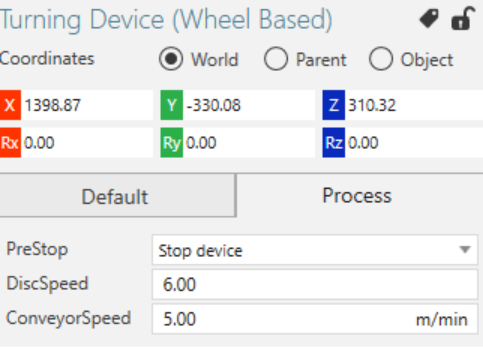
When using the signal option, you need to connect the ConveyorPreStop signal to the conveyor/conveyors that the signal should control. The signal value is by default set to False to signal not stopping. It sends out the value True when a product triggers the first sensor and sends out the value False when a product passes the second sensor. To avoid the need of connecting the signal to a boolean signal inverter in situations where the inverted signal values are needed, you can directly invert the signal values by checking the InvertPreStopSignal box.
Signal stop examples
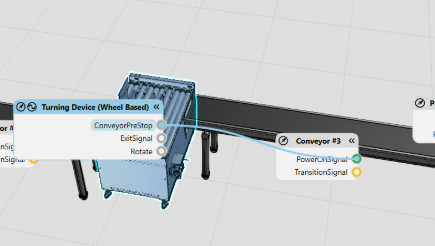
The left picture below shows the Turning Device connected to Visual Components conveyors. The ConveyorPreStop signal is here connected to the ingoing conveyor’s PowerOnSignal. The conveyor is running when the PowerOnSignal is True, meaning that in this case the the InvertPreStopSignal box needs to be checked to get the correct signal value flow.
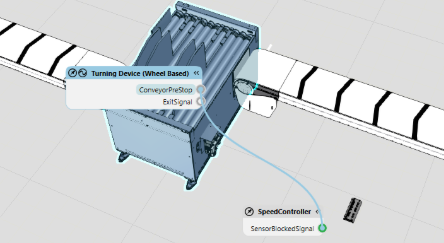
The picture to the right shows the Turning Device connected to FlexLink conveyors. The ConveyorPreStop signal is connected to the SensorBlockedSignal of a Speed Controller, which is configured to control the end drive of the ingoing FlexLink conveyor. In this case the Speed Controller will stop the conveyor when the SensorBlockedSignal is True, consequently the InvertPreStopSignal box should be unchecked.